
Download FamiStudio – Free Chiptune Composer for Mac
Overview
FamiStudio is a free multimedia application crafted specifically for macOS users who want to dive into the nostalgic world of 8‑bit and 16‑bit video‑game music. Unlike generic DAWs, FamiStudio focuses on the chiptune genre, offering an intuitive interface that mirrors the workflow of classic console sound chips while still providing modern conveniences such as drag‑and‑drop editing, real‑time preview, and multi‑track support. Whether you are a hobbyist looking to experiment with retro sounds or a professional composer tasked with recreating authentic game‑style scores, FamiStudio gives you the tools to write, arrange, and export music without the steep learning curve associated with larger production suites. Its built‑in synthesizer emulates the NES/Famicom sound engine, and the software supports exporting to a variety of formats—including WAV, MP3, and the original .NSF chip‑tune file—making it easy to integrate your creations into game projects, streaming platforms, or personal playlists. The application is completely free, open‑source, and receives regular updates that keep it compatible with the latest macOS releases, ensuring a secure and stable environment for creative work.
Key Features that Set FamiStudio Apart
- Built‑in NES/Famicom Synthesizer: Emulates the original sound chip, providing authentic waveforms, envelopes, and noise channels.
- Multi‑track Composition: Supports unlimited tracks, allowing complex arrangements with separate instrument layers.
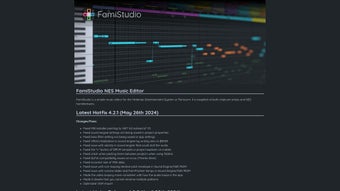
- Intuitive Piano‑Roll Editor: Drag‑and‑drop notes, real‑time playback, and velocity control for precise tuning.
- Instrument Editor: Create custom waveforms, adjust duty cycles, and fine‑tune vibrato and arpeggio patterns.
- Export Options: Export to WAV, MP3, OGG, and the original .NSF format; batch export multiple songs at once.
- Cross‑Platform Project Files: Save projects in a portable .FamiStudio format that can be opened on Windows, Linux, and macOS.
- Real‑time Preview & Looping: Instantly hear changes and loop sections for efficient iterative composing.
- Free & Open‑Source: No hidden fees, ad‑free experience, and a supportive community for plugins and extensions.
- Keyboard Shortcuts & Customizable UI: Speed up workflow with hotkeys and adjustable layout panels.
- Regular Updates & Secure Downloads: Automatic update checks ensure you always have the latest, most secure version.
These features combine to make FamiStudio a specialized yet versatile tool for anyone interested in retro game music. The software balances authenticity—through accurate chip‑tone emulation—with modern production conveniences like multi‑track editing and extensive export capabilities. For creators who value both the classic sound and a smooth user experience, FamiStudio stands out as a uniquely focused, free solution.
Installation & Usage Instructions
Step‑by‑Step Installation on macOS
Getting FamiStudio up and running on your Mac is straightforward. Follow these steps for a hassle‑free setup:
- Download the Installer: Visit the official FamiStudio GitHub releases page and click the latest macOS .dmg file. The download is secure, checksum‑verified, and completely free.
- Mount the Disk Image: Double‑click the .dmg file. macOS will open a new window displaying the FamiStudio application icon.
- Copy to Applications: Drag the FamiStudio icon into your Applications folder. This ensures the app receives the necessary permissions and can be launched from Spotlight.
- Open the App: Navigate to Applications, right‑click FamiStudio, and select “Open.” The first‑time launch warning can be bypassed by confirming you trust the developer.
- Check for Updates: Once opened, go to FamiStudio → Check for Updates** in the menu bar to ensure you have the latest version.
Basic Workflow for Creating a Chiptune Track
After installation, start a new project by selecting File → New Project**. You’ll be greeted by the main window split into three primary panes: the track list, the piano‑roll editor, and the instrument panel. Here’s a quick guide to get you composing:
- Create Instruments: Click the “+” button in the instrument panel. Choose a preset (Square, Triangle, Noise, etc.) or design a custom waveform using the built‑in editor.
- Add Tracks: In the track list, click “Add Track.” Assign an instrument to each track by dragging the instrument name onto the track header.
- Place Notes: Use the piano‑roll to click and drag notes onto the grid. Adjust note length, velocity, and pitch by dragging the edges or using the right‑click context menu.
- Preview in Real Time: Press the spacebar or click the play button. The built‑in synthesizer renders the audio instantly, allowing you to hear changes as you make them.
- Export Your Song: When satisfied, go to File → Export**. Choose your preferred format (WAV for highest quality, MP3 for smaller files, or NSF for direct use in emulators).
This workflow is designed to keep you focused on creativity rather than technical hurdles. The UI is highly responsive, and keyboard shortcuts (e.g., Ctrl+Z for undo, Ctrl+S for save) further accelerate the composition process.
Compatibility, Pros & Cons, and Expert Review
FamiStudio runs natively on macOS 10.13 (High Sierra) and later, including Apple Silicon (M1/M2) thanks to Rosetta 2 support and native ARM builds. The same project files can be opened on Windows and Linux, making collaboration across platforms seamless.
Pros
- Completely free and open‑source, with no hidden costs.
- Authentic NES/Famicom sound engine for true retro fidelity.
- Multi‑track editing and extensive export options.
- Lightweight, low‑CPU usage – ideal for older Mac hardware.
- Active community providing tutorials, presets, and plugins.
Cons
- Limited to chiptune styles; not suited for full‑scale orchestral production.
- No built‑in audio effects (reverb, delay) beyond the chip‑tone parameters.
- Interface, while functional, may feel dated compared to commercial DAWs.
- Advanced MIDI integration is minimal – primarily focused on internal sequencing.
Overall Rating: 4.5 / 5
FamiStudio delivers a surprisingly powerful chiptune creation experience for macOS users at zero cost. Its authenticity, ease of use, and export flexibility make it a top choice for both beginners and seasoned retro composers. While it lacks advanced effects and broader genre support, the focused feature set ensures that users can produce high‑quality NES‑style tracks without distraction. Regular updates and a supportive community further cement its place as the go‑to free tool for video‑game music enthusiasts.
Frequently Asked Questions
Is FamiStudio truly free or are there hidden charges?
FamiStudio is 100 % free. It is open‑source software released under the MIT license, meaning there are no subscription fees, in‑app purchases, or hidden costs. All features are available to every user.
Can I use FamiStudio on an M1/M2 Mac?
Yes. The latest builds include native Apple Silicon binaries, delivering optimal performance on M1 and M2 chips. Older Intel‑based Macs are also fully supported.
What export formats does FamiStudio support?
FamiStudio can export to WAV, MP3, OGG, and the classic .NSF (Nintendo Sound Format). Batch export allows you to render multiple songs in one operation.
Is it possible to import MIDI files into FamiStudio?
FamiStudio includes basic MIDI import, converting MIDI notes to the internal chiptune representation. However, complex MIDI data (tempo changes, extensive controller messages) may be simplified during import.
How frequently are updates released?
The development team releases major updates roughly every 3–4 months, with smaller bug‑fix patches as needed. The app checks for updates automatically on launch.
Conclusion – Start Your Retro Music Journey Today
FamiStudio stands out as a dedicated, free, and secure solution for macOS users who want to create authentic video‑game chiptunes without the overhead of a full‑blown DAW. Its feature‑rich environment, straightforward installation, and cross‑platform project compatibility empower both beginners and seasoned composers to produce high‑quality retro tracks in minutes. While it focuses exclusively on the 8‑bit/16‑bit aesthetic—meaning it isn’t a universal music production suite—it excels at what it promises: delivering a true‑to‑hardware NES/Famicom sound engine with modern workflow conveniences.
If you’re ready to experiment with classic game music, unleash your creativity, or simply enjoy the nostalgic thrill of composing as if you were back in the 80s, download FamiStudio now. The free, open‑source nature ensures you can start composing instantly, and the active community guarantees support and inspiration as you grow your chiptune skills.
Take advantage of the secure, regular updates, export your tracks in multiple formats, and share your retro masterpieces with the world—all from a lightweight, Mac‑optimized app. Happy composing!







